Copy paste problem in Excel after update KB5002914
Step.1 Open Command Prompt or or Right Click Search bar. Terminal (Admin)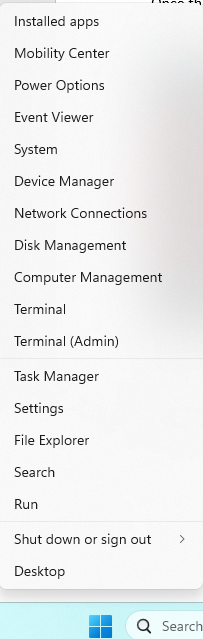
Step 2. Paste the following command and press Enter: "C:\Program Files\Common Files\Microsoft Shared\ClickToRun\OfficeC2RClient.exe" /update user updatetoversion=16.0.10417.20197 Paste the following command and press Enter:
type CMD press Enter "C:\Program Files\Common Files\Microsoft Shared\ClickToRun\OfficeC2RClient.exe" /update user updatetoversion=16.0.10417.20197
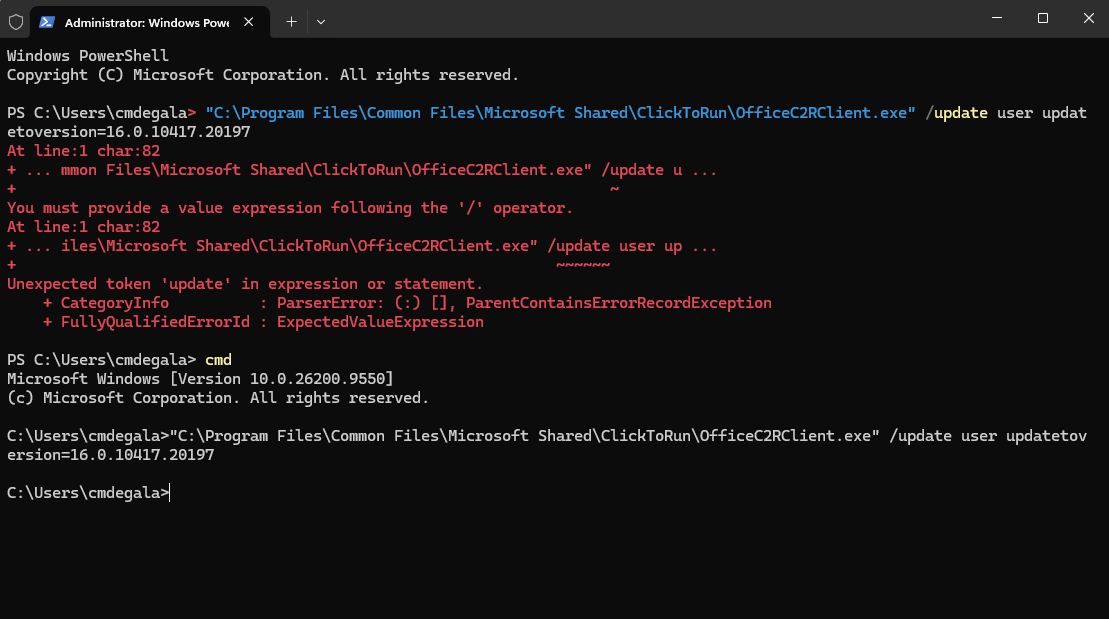
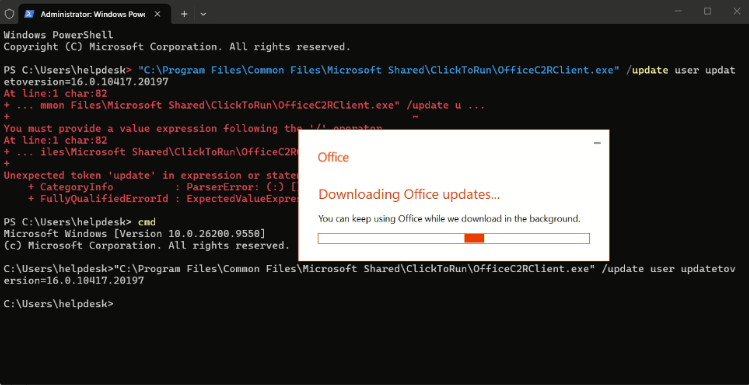
Once done, type cmd into the terminal and paste the following command press Enter again to force update Microsoft Excel. Wait a few minutes for the process to complete.
Once the force update is finished, you can test it again to check if the issue has been resolved.
x
Was this article helpful?
That’s Great!
Thank you for your feedback
Sorry! We couldn't be helpful
Thank you for your feedback
Feedback sent
We appreciate your effort and will try to fix the article